Equiply vs Cheqroom: Key Differences Every Small Business Should Know

Table of Contents
- •Head-to-Head Comparison Between Equiply and Cheqroom
- ◦1. Onboarding and Setup Experience
- ◦2. Role-Based Accountability
- ◦3. Real-Time Insights with the Command Dashboard
- ◦4. Tracking the Full Equipment Lifecycle
- ◦5. Check-In, Check-Out, and Overdue Management
- ◦6. QR Codes and Digital Twins
- ◦7. Reporting, Analytics, and Audit Readiness
- ◦8. Multi-Organization and Scaling Support
- ◦9. User Experience and Accessibility
- •Equiply vs Cheqroom Summarized
- •Conclusion
How efficiently you manage your equipment is a game-changer for your day-to-day business operations. And to do that, you need to keep track of everything, prevent losses and misses, and make sure everyone using the item is accountable. Equipment management platforms are a good tool to manage everything with ease; Equiply and Cheqroom are two of the popular options among them.
Both of these platforms create a smooth workflow for asset tracking and check-ins/outs. However, they approach efficiency, usability, and transparency differently. In this guide, we’ll cover the key differences between Equiply and Cheqroom so you can decide which one of them fits your business best.
TL;DR Key Takeaways
- Faster, automatic setup & easier-to-use interface.
- Automated, real-time financial depreciation tracking.
- Tamper-proof audit logs for compliance.
- Automatic overdue alerts; no manual searching.
- Managing multiple offices in one account.
- Using any smartphone as a dedicated scanner.
Head-to-Head Comparison Between Equiply and Cheqroom
1. Onboarding and Setup Experience
Time is extremely important for small businesses. You don’t want to spend too much time wasting on setting up and training your employees on the software you use.
Equiply has an instant onboarding process that lets you set up everything within 60 minutes. It automatically sets up your country, currency, and timezone from your IP address. Avoiding manual configuration at this stage means your workspace is ready the moment you sign in.
Cheqroom requires a bit more setup time. Users manually need to enter location details, categories, and set up permissions first. Then they can begin assigning assets. It may not be much for some users, but it can slow down smaller teams that want to get organized fast.
2. Role-Based Accountability
Equiply and Cheqroom both have user roles and permissions. However, Equiply stays a bit ahead with a non-traditional approach:
- Admins have full control
- Managers can assign equipment and track where it is without seeing financial data
- Users only see data on what’s personally assigned to them
When everyone has different roles, you have a clear chain of accountability in your organization. It also minimizes confusion and misuse. Cheqroom offers standard roles, but with broader permissions. While it may be good in some cases, it can also expose data to users that are beyond their responsibilities.
3. Real-Time Insights with the Command Dashboard
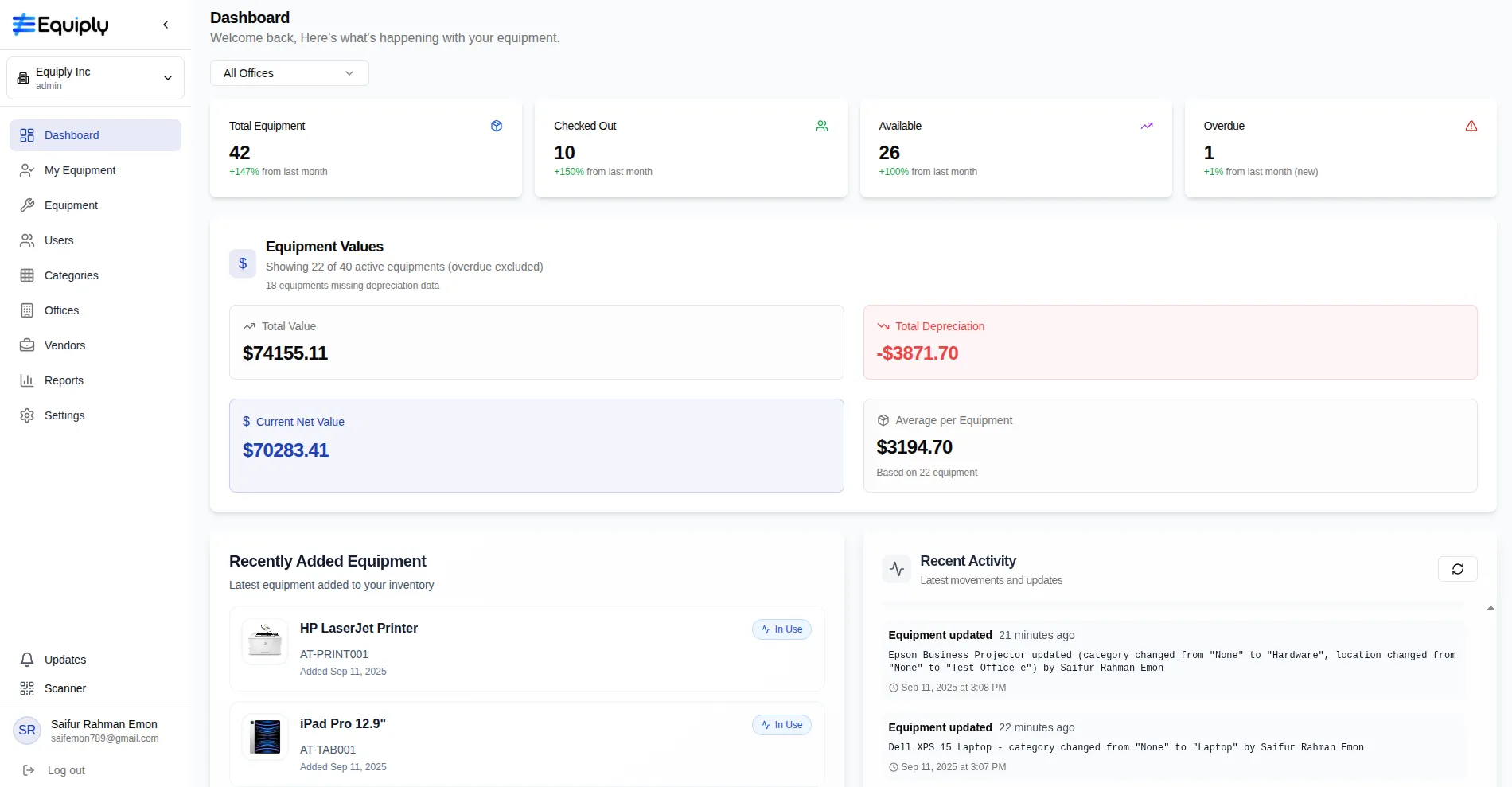
Equiply has an Intelligent Command Dashboard. Everything you need to know is right in front of you, live. Cheqroom has all the information, but you have to ask for it, and it's not live.
Equiply’s dashboard shows total, checked-out, available, and overdue items in real time. You can also see financial valuations statistics and live activity feeds at a glance. In Cheqroom, you need to generate separate reports to view insights on usage or value.
4. Tracking the Full Equipment Lifecycle
Cheqroom has an edge in lifecycle management: it helps you track and schedule repairs and servicing for your equipment. For complex equipment, it's critical because it ensures safety, proves compliance with regulations, and helps equipment last longer.
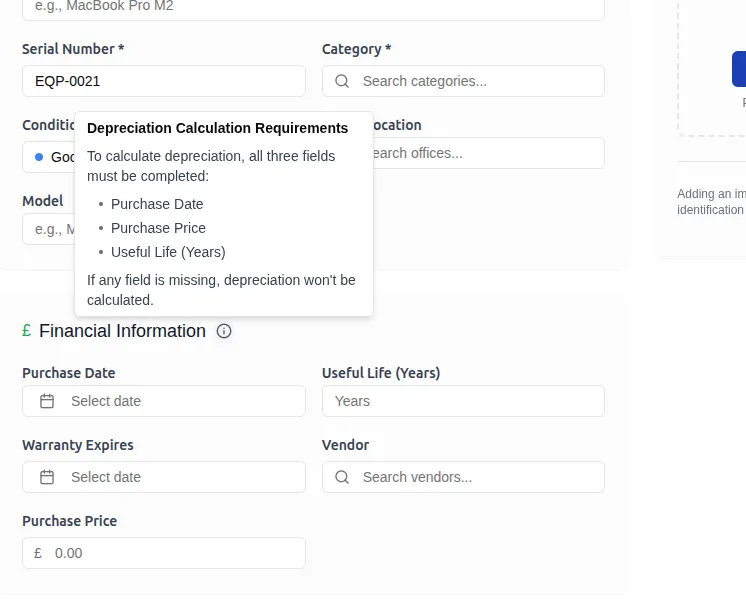
However, Equiply’s advantage is in the automated depreciation calculator. It automatically figures out how much your equipment has dropped in value over time, and it updates this number every single day. Your balance sheet and insurance estimates always stay accurate without manual input this way.
5. Check-In, Check-Out, and Overdue Management
Both Cheqroom and Equiply handle the fundamental task well: assign equipment and set return dates.
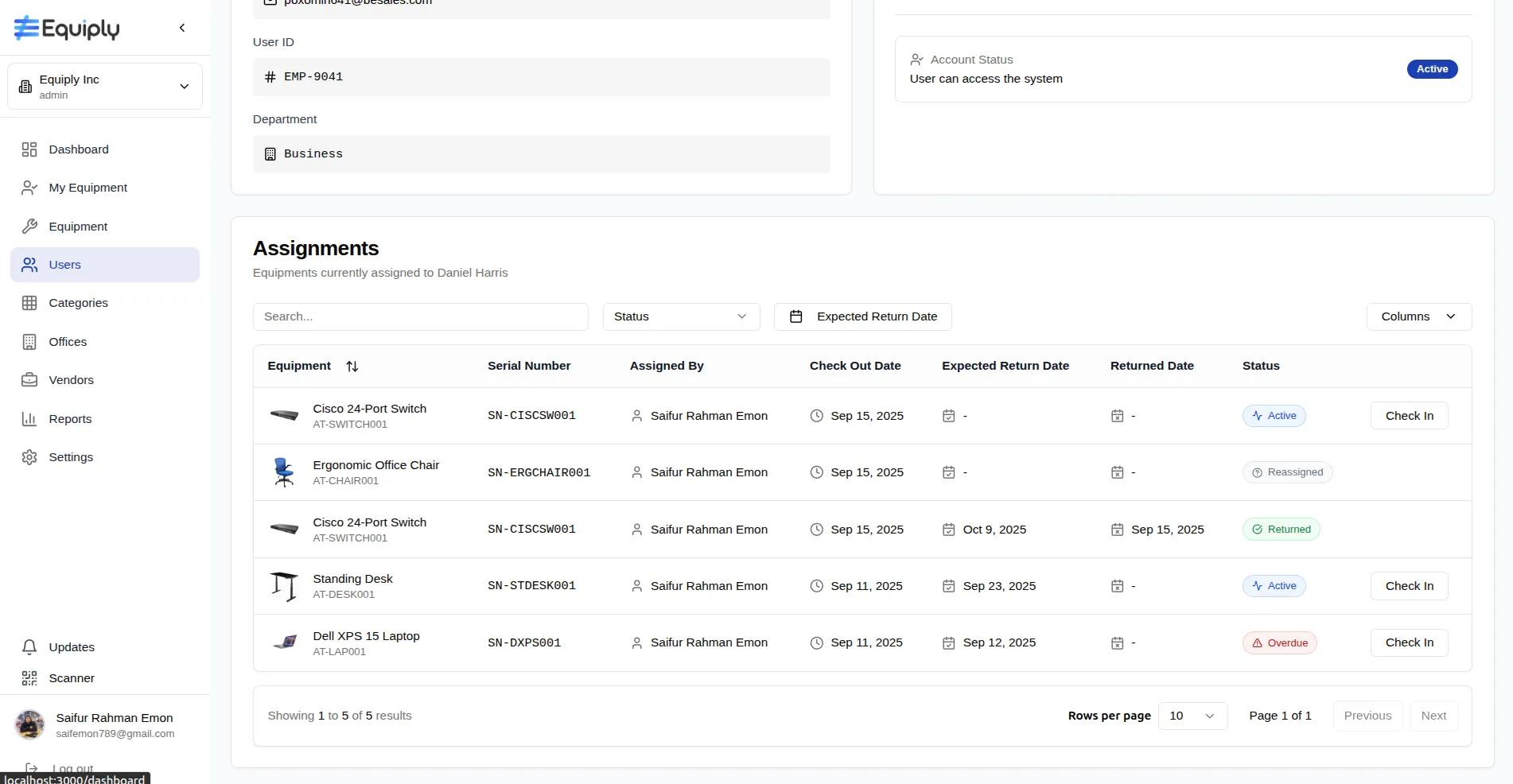
Equiply's key advantage is automation and proactive alerts (“robotic watchdog”). The system constantly checks the calendar. The second an item's return date passes, it is immediately and automatically marked as "Overdue". The status also shows up in dashboards, user profiles, and lists.
Equiply’s logging process is immutable; you can’t change or delete the activity log without special permissions. It helps with creating a tamper-proof audit trail.
Cheqroom’s capability to track overdue items isn’t automatic. The information stays in the database. To find out what’s overdue, you need to go to the reporting section, filter, and then generate the report.
6. QR Codes and Digital Twins
Checkroom supports barcode and RFID options. It is great for larger organizations like universities, large studios, or industrial companies. They may already own the scanners and have a process in place, and Cheqroom fits right into that.
Equiply lets your phone be the scanner. Instead of buying pre-made tags or using third-party programs, Equiply generates QR codes for you, and you can use the phone camera to scan them. In Equiply, every physical item (like a laptop) also has a perfect digital copy in the software that contains all its information (digital twin).
When you scan the QR code on the physical laptop with your phone, you are instantly opening its "digital twin" in the app. You immediately see:
- Its full history (who used it before, repair records).
- Its specifications.
- Its current status (available, assigned, overdue).
- Its financial value.
7. Reporting, Analytics, and Audit Readiness
Equiply’s logs cannot be changed, edited, or deleted after the fact. This is what makes it legally trustworthy. Your company is always prepared for an official inspection (an "audit") from regulators, insurers, or financial controllers without having to scramble to prepare documents.
Just like an airplane's black box flight recorder, this log provides an unchangeable truth of events. It tracks:
- Every Action: "Checked out," "Checked in," "Marked for Repair."
- Timestamp: The exact date and time the action occurred.
- User: Which employee performed the action?
Cheqroom’s logs can be altered. While they are still useful for internal tracking and day-to-day operations, their editability creates a major problem for compliance. That’s why these logs can’t always serve as a fully compliant record, especially in regulated industries like healthcare or education.
8. Multi-Organization and Scaling Support
Businesses grow, and so does the inventory they use. When a small business team turns into multiple departments or offices, managing them becomes challenging.
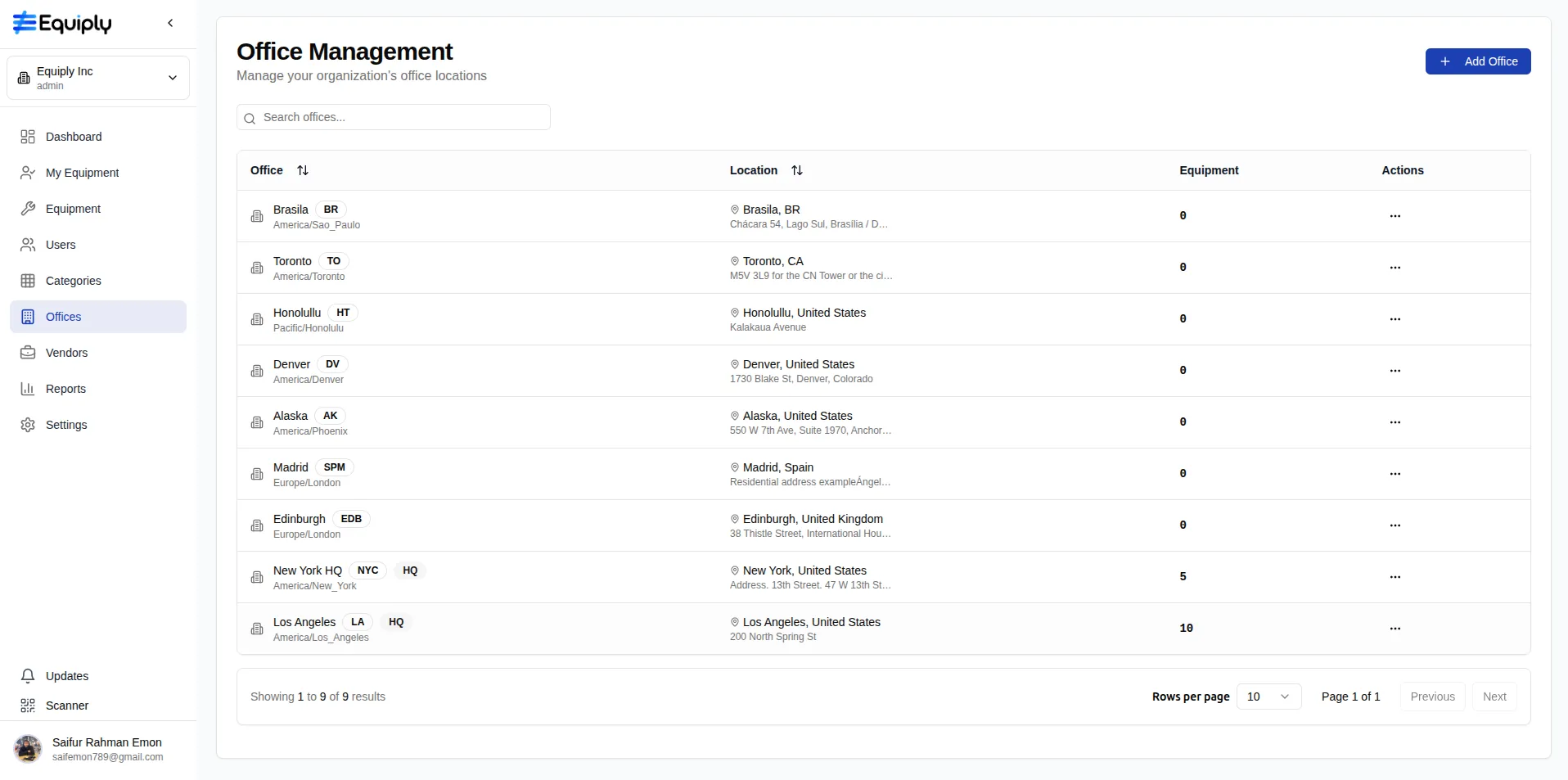
Equiply has a multi-organization and multi-office switching feature, which can be used for different locations and clients without logging in and out repeatedly. With customized roles, you can even invite contractors or freelancers with temporary access rights.
If you want Cheqroom to access multiple locations, you need multiple setups. Usually, each organization needs its own setup or configuration. Small teams often don’t need different locations, but for large organizations, it is a hectic process.
9. User Experience and Accessibility
Cheqroom's interface is well-designed and resembles other business software you likely have already used. "Familiar" can also mean it has a steeper learning curve for new or non-technical users. It might require more formal training for everyone to feel comfortable.
Equiply prioritizes more on modern and minimalistic design. It highlights the most important information and action. That means you can get your team up and running with very little instruction.
The Equiply app has a button or tab right on the main screen that is only for scanning. You open the app and you're instantly in scanner mode, ready to go. In Cheqroom, you have to navigate through the app and then find and press a button to activate the camera.
Equiply vs Cheqroom Summarized
| Feature Focus | Equiply | Cheqroom |
| Setup & Onboarding | Automatic setup within 60 seconds | Manual configuration required |
| Financial Tracking | Built-in daily depreciation calculator | Manual or periodic updates |
| Audit & Logs | Immutable activity log | Editable or partial audit logs |
| Multiple Organization Management | Switching between offices and organizations within the same app | Requires separate setups |
| Mobile App Scanning | Has dedicated scanner tabs with QR codes | Uses a general device camera |
| Lifecycle Tracking | Tracks depreciation & condition | Tracks service records & workflows |
Conclusion
Both Equiply and Cheqroom offer capable asset management solutions. The right choice depends on your priorities. If you manage complex maintenance workflows or need advanced service record tracking, choose Cheqroom. Go for Equiply if you prefer speed, automation, financial clarity, and top-notch accountability.
Small businesses often need to get started quickly without extra setup, spreadsheets, or training. Equiply offers a faster, smarter, and more transparent way for total equipment control to them.